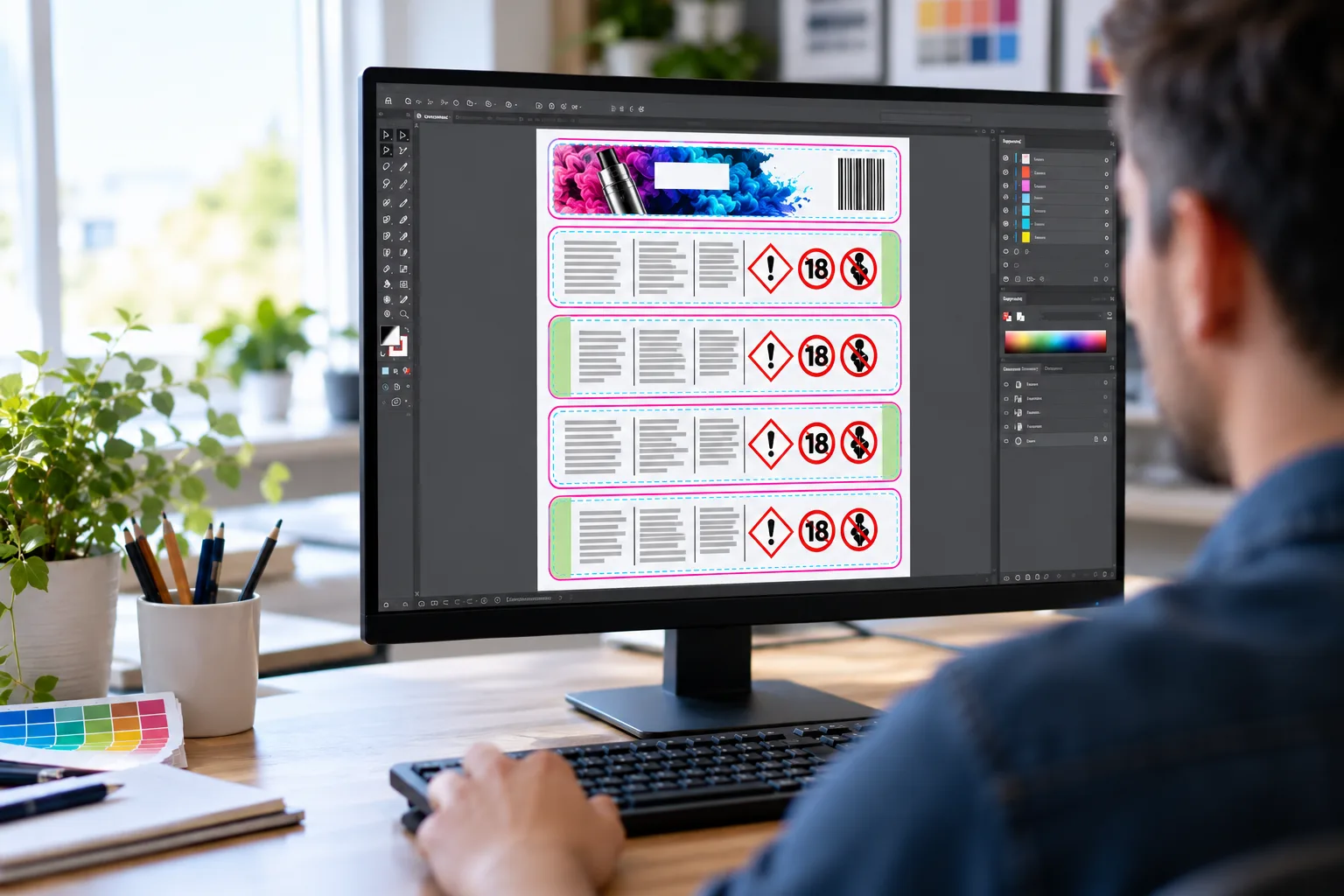
Peel and Reveal Label Design Guide: How to set up your peel and reveal labels
Avoid unnecessary studio fees with our peel and reveal label design guide and free template builder. Save yourself from an unpleasant artwork charge when getting your peel and reveal labels ready for press.
Peel and reveal artwork is identical in almost every way to any other label design. These should be made using industry-standard artwork guidelines, like our own.
The main difference is making space for the binding, or hinge of the peel and reveal label. This binding can have artwork on it, but no text, as this would be concealed in the binding.
Peel and reveal label mini-explainer.
Peel and reveal labels are a multi-layer label type designed and built to act like a booklet with a single bound edge. This binding is normally on the left-hand edge as you would look at the label face (as a customer would see).
The binding is achieved with a 2mm high-tack adhesive strip on the hinge, and the pages are made peelable with low-tack adhesive. This means users can open the label like a small book, and read text on ‘pages’ two, three, four and five.
Peel and reveal labels are ideal for small packaging items with limited labelling space. The front labelling is used for product identification, with the inner pages used for regulatory information, or multiple language information when selling into international markets.
Peel and reveal label design
Artwork should be prepared in Adobe Illustrator or Indesign – industry standard software. Alternatively, there are free vector graphic design tools such as Inkscape or Scribus that you can use to build print-ready artwork in full CMYK colour mode and ready for press.
Artboard/Cavass Size
Inexperienced designers or customers build their label design to the size they want their labels. This is wrong and can lead to disappointment in finished labels or artwork fees to correct the artwork and make it suitable for print. It also slows down the order process whilst artwork is stalled in the studio.
The rule of thumb is to make the artboard or canvas 3mm larger than the label you want. So for a 50mm x 30mm peel and reveal label, the artboard should be set up as 53mm x 33mm. This additional area is for bleed – needed for the print process.
What is bleed?
Labels are made in multiple lanes, printed side by side and end to end. The initial print floods the whole feedstock material. After printing, the label conversion process cuts individual label shapes from the printed feedstock. This is done using either rotary or semi-rotary metal die cutters, or in some cases, lasers.
EFI Jetrion 4900 laser die cutting in action
The die cut separates the matrix (waste) from the label, but it is all still stuck to the liner. The matrix is then stripped away from the printed feedstock, leaving a large roll of labels with several lanes and labels end to end.
The bleed is the waste matrix and it is needed to give tolerance during production. Why?
Labels are made fast – printed and processed anywhere between 20 and 120 metres of material per minute. When you see videos of labels being made, that is normally slowed down for effect. But because the machinery runs fast (to make labels cheaper to produce), there is some movement front and back and side to side. Bleed lets that happen without impairing the quality of the label.
Die Lines and Safe Areas
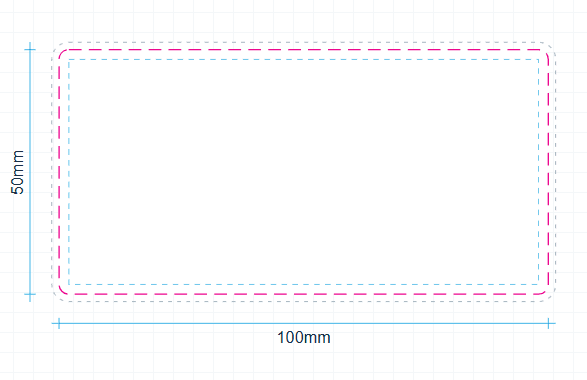
Die lines are where the label is cut, where the die strikes the material and liner to cut the label shape. We use these in artwork to ensure the label will look how you want.
Safe Areas are like a bleed, but inside the die line rather than outside. We only want to see text, logos, devices and barcodes within the safe area so we know they will appear within the cut label.
On a normal single-face label, the safe area should be 2mm. This means that if there is any drift during production, your text will still be on the label, rather than clipped off by the cutter.
How does this affect my peel and reveal label design?
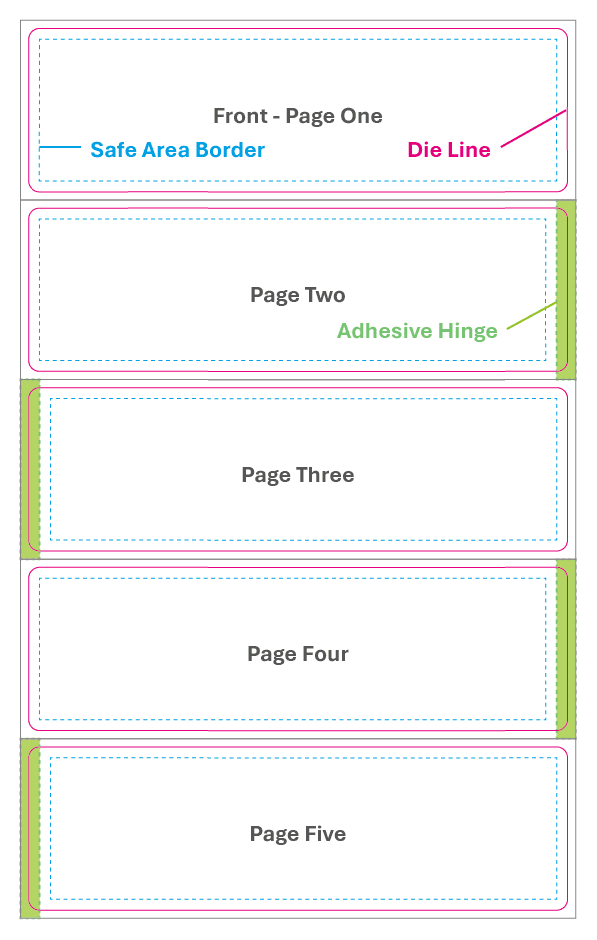
The concept of bleed and safe space needs to be applied to peel and reveal label design with an extra nuance – we need to account for the hinge on the label.
When designing the label, we need to account for the 2mm high-tack adhesive hinge. As this 2mm encroaches into the label face, we have to remove that from the safe area on that page.
Pages of the label design alternate from page two to three and four to five – as they would in a book. On page one, we just have the label, bleed and safe area. On pages two and four, we need that safe area to be 2mm inward of the right-hand edge, and then on pages three and five, we need it to be 2mm inward of the left-hand page.
Whilst not strictly enforced, we also recommend adding an extra mm to the safe space on the interior of the hinge.
Download your own peel and reveal design template with our creation tool below. Download this simple “Peel Here” indicator (zipped svg file).
Peel and Reveal Template Builder
Enter your finished label size and the number of pages. You get a scaled SVG template with bleed, die lines, safe areas and the adhesive hinge marked on every page.
The template builder needs JavaScript. If this message stays, refresh the page or call us on 01332 864895 and we will send you a template.
Your label
Template sizes
| Artboard per page | |
| Whole document | |
| Die line, every page | |
| Front safe area | |
| Inner page safe area | |
| Adhesive hinge |
The hinge takes 2mm of the label on every inner page, so the safe area steps away from it: left on pages 2 and 4, right on pages 3 and 5. Artwork can run across the hinge, but text cannot.
Opens in Illustrator, Inkscape or Scribus. Set the die line as a spot colour with overprint before you send artwork to print.
We supply 3 and 5 page peel and reveal labels. Send us your finished artwork for a fixed-price quote on 01332 864895.
Template preview
Positive ID Labels · 01332 864895 · pid-labelling.co.uk