
Thermal Ribbons
Good barcodes scan first time. Faded ones don’t. If you’re getting smudged text, peeling print, or labels that degrade in storage, the ribbon is almost always where the problem starts.
Positive ID Labels has been specifying and supplying thermal printer ribbons alongside printed label stock for over 20 years. This guide covers everything you need to know – ribbon types, print head compatibility, material matching, and how to fix the most common problems. Get this right and your thermal printer will perform consistently, run after run.
Related products and guides
- See also: ribbon supplies.
- Part of our wider Thermal Printing range.
Thermal Printer Ribbons: The Complete Guide
Good barcodes scan first time. Faded ones don’t. If you’re getting smudged text, peeling print, or labels that degrade in storage, the ribbon is almost always where the problem starts.
Positive ID Labels has been specifying and supplying thermal printer ribbons alongside printed label stock for over 20 years. This guide covers everything you need to know – ribbon types, print head compatibility, material matching, and how to fix the most common problems. Get this right and your thermal printer will perform consistently, run after run.
What Are Thermal Transfer Ribbons?
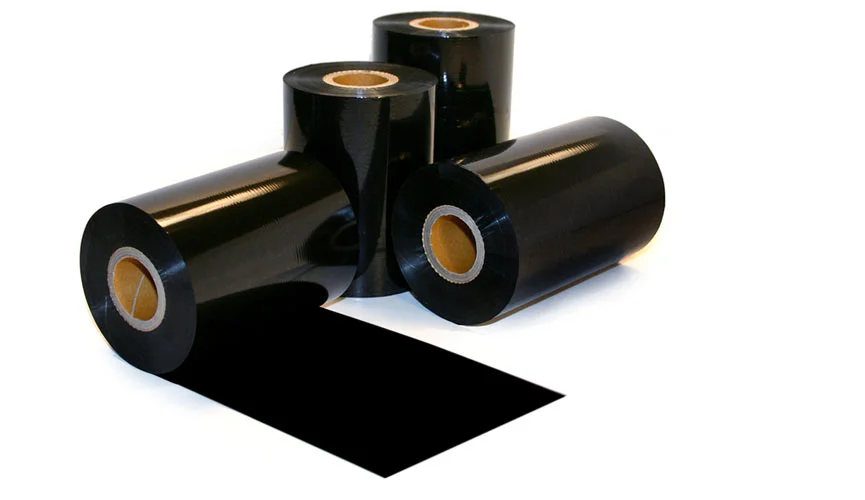
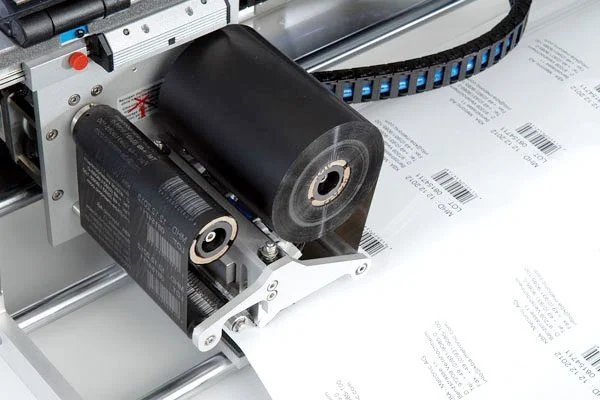
Thermal transfer ribbons – often called TTR – are thin films coated with an ink layer made from wax, resin, or a combination of both. They work in both desktop thermal label printers and industrial thermal label printers. When a thermal print head applies heat to the ribbon, that ink melts and bonds to the label surface below.
This is different from direct thermal printing, which uses chemically treated direct thermal labels (paper or polypropylene) that darkens under heat. Thermal transfer can work on almost any thermal label material: paper, plastic, or synthetic film providing the right thermal ribbon type is cosen. The ribbon provides the ink. The label surface accepts it.
The result is a printed label that is far more durable than direct thermal output. Direct thermal labels fade under UV exposure, heat, and handling. A correctly specified thermal transfer label can last years.
Types of Thermal Printer Ribbons
Wax Thermal Printer Ribbons
Wax ribbons are the most widely used and most cost-effective option. The ink layer is primarily paraffin wax, which melts at a lower temperature and bonds well to paper surfaces.
Best for: Standard coated and uncoated paper labels, vellum, shipping labels, retail price labels, and any application where the label will be used indoors without exposure to abrasion, heat, or moisture.
Not ideal for: Plastic or synthetic substrates, outdoor applications, or anywhere print will face physical handling.
Wax-Resin Thermal Printer Ribbons
Wax-resin ribbons blend wax and resin in the ink layer. This combination improves adhesion and print durability compared to pure wax while remaining more affordable than full resin.
Best for: Coated papers where higher print quality or sharper edges are needed, light synthetic materials, product labels that will be handled regularly, and retail or food applications requiring a cleaner finish.
Not ideal for: Full plastics like polypropylene or polyester, or chemically aggressive environments.
Resin Thermal Printer Ribbons
Resin ribbons use a fully synthetic ink layer that requires higher heat to transfer. This produces the hardest, most durable print available from a thermal transfer printer.
Best for: Synthetic substrates including polypropylene (PP), polyethylene terephthalate (PET), and polyester films. Chemical labels, outdoor labels, laboratory samples, and anywhere print must resist abrasion, solvents, moisture, or prolonged UV exposure.
Not ideal for: Standard papers at low print speeds – resin ribbons can damage print heads if used incorrectly on incompatible materials.
Coloured Thermal Printer Ribbons
Most thermal transfer ribbons are black, but colour options are available – white, red, blue, gold, silver, and others depending on the ribbon type. White ribbon is particularly useful for printing onto dark or coloured label stock where standard black ink would be invisible.
Understanding Print Head Types
Flat-Head Print Heads
Flat-head (also called near-edge) print heads position the heating elements close to the ribbon peel point. They are the standard configuration for most desktop and industrial thermal transfer printers. Compatible with all three ribbon types at the appropriate settings.
Near-Edge Print Heads
Near-edge heads place the heating elements directly at the ribbon peel point, allowing faster print speeds and sharper edges on synthetic materials. Commonly found in high-speed industrial printers. Near-edge configurations typically require resin or high-quality wax-resin ribbons to perform consistently.
Matching Thermal Printer Ribbons to Your Print Head
Using the wrong ribbon on your print head accelerates wear. A resin ribbon running too hot on a flat-head printer will over-melt the ink layer and create haze or smearing. A wax ribbon on a near-edge head won’t release the ink cleanly. Always check the ribbon specification against your printer manufacturer’s guidance.
Matching Thermal Printer Ribbons to Label Materials
How to Choose Thermal Printer Ribbons for Your Substrate
The single most important factor in thermal ribbon selection is the label material. A mismatch here is the cause of most print adhesion failures, smearing, and premature label degradation.
The general rule: the harder or smoother the label surface, the higher the resin content required in the ribbon.
Vellum paper – Uncoated and slightly porous. Wax ribbons bond well to the surface texture. Wax-resin is also suitable if print quality needs to be sharper.
Semi-gloss and gloss papers – Coated surface with less texture. Wax ribbons work on semi-gloss but wax-resin is the better choice for consistent adhesion and sharper print definition. Gloss papers should always be paired with wax-resin as a minimum.
Polypropylene (PP) – Smooth plastic surface. Only resin ribbons bond reliably to PP. This is one of the most common ribbon specification errors – wax and wax-resin ribbons applied to PP will rub off under normal handling.
Polyethylene (PE) – PE film has a low melting point and can distort under the heat required for thermal transfer. It is generally not recommended as a thermal transfer substrate. If you are working with PE, consult your ribbon and printer supplier before proceeding.
PET (polyester) – High-performance synthetic film. Resin ribbons required. PET labels are used in demanding applications including chemical environments, outdoor exposure, and laboratory identification where durability is critical.
Ribbon and Material Compatibility Table
| Label Material | Wax | Wax-Resin | Resin |
|---|---|---|---|
| Vellum (uncoated paper) | ✓ Best | ✓ Good | – |
| Semi-gloss paper | ✓ Good | ✓ Best | – |
| Gloss paper | – | ✓ Best | ✓ Good |
| Polypropylene (PP) | ✗ | – | ✓ Required |
| Polyethylene (PE) | ✗ | ✗ | Consult supplier |
| PET / Polyester | ✗ | – | ✓ Required |
| Thermal transfer synthetic film | – | ✓ Good | ✓ Best |
Common Ribbon Problems and Fixes
Troubleshooting Thermal Printer Ribbons in the Field
Five Common Thermal Printer Ribbon Failures
Print is rubbing off after application Almost always a ribbon-substrate mismatch. If labels are plastic or synthetic, you need a resin ribbon. Check what material your labels are made from and upgrade the ribbon formulation accordingly.
Smearing or haze across the printed area Print head temperature is too high for the ribbon type, or the printer is running too fast for the ribbon specification. Reduce print speed or heat settings, or switch to a ribbon rated for higher-speed printing.
Ribbon wrinkling or tearing during printing Often caused by incorrect ribbon tension, a worn print head, or a ribbon that is too narrow for the label width. Check the ribbon is loaded correctly and inspect the print head for debris or wear.
Patchy print or missing dots Usually indicates a dirty or damaged print head. Clean the print head with isopropyl alcohol and a lint-free cloth. If the problem persists, the head may need replacing.
Print fading quickly in storage or use The ribbon formulation is not matched to the environment. If labels face UV, heat, or chemical exposure, switch to a higher-resin ribbon or a full resin option.
Frequently Asked Questions
What is the difference between wax, wax-resin, and resin thermal printer ribbons? The difference is durability and substrate compatibility. Wax ribbons suit paper labels and everyday applications. Wax-resin offers better adhesion and print quality on coated papers and light synthetics. Resin ribbons are the only option for plastic substrates like polypropylene and PET, and for applications where print must resist abrasion, chemicals, or outdoor exposure.
Can I use any thermal printer ribbon with my printer? Not quite. Ribbons must be matched to your printer’s print head type (flat-head or near-edge), your label material, and your print speed settings. Using an incompatible ribbon can damage your print head and produce poor quality output. Check the ribbon specification against your printer model before ordering.
Why is my thermal transfer print rubbing off polypropylene labels? Because a wax or wax-resin ribbon is being used on a plastic substrate. Polypropylene requires a resin ribbon to bond correctly. This is one of the most common thermal printing errors – and one of the most straightforward to fix.
Are thermal transfer ribbons available in colours other than black? Yes. Ribbons are available in a range of colours including white, red, blue, gold, and silver. White is particularly useful for overprinting onto dark or coloured label stock. Colour availability varies by ribbon type and width – call 01332 864895 to discuss your requirements.
What width and length thermal printer ribbon do I need? Ribbon width should match or slightly exceed your label width. Standard core sizes vary by printer model. Length is typically 300m or 600m rolls – the right length depends on your print volume and how frequently you want to change ribbons. If you’re not sure, our team can confirm the correct specification for your printer model.
How do I know when a thermal printer ribbon needs replacing? Print quality degrades as the ribbon depletes. You may see lighter print, patchy coverage, or ribbon wrinkling as the roll nears its end. Most printers have a ribbon-end sensor that will alert you. Always keep a spare roll to avoid production downtime.
Get the Right Thermal Transfer Ribbons
Getting ribbon specification right is not complicated – but getting it wrong is costly. Wrong ribbon on the wrong substrate means labels that fail in the field, wasted stock, and avoidable downtime.
Positive ID Labels supplies thermal printer ribbons to match our full printed label range, ensuring compatibility from the start. Whether you need wax for high-volume paper labels or resin for polypropylene and PET applications, we’ll point you to the correct specification for your printer, your material, and your environment.
Not sure what you need? Call 01332 864895 and our technical team will confirm the right ribbon for your setup – usually in a single conversation. Or complete our enquiry form and we’ll come back to you.
Related: Delta Sound Surrey – Case Study – real-world example of ribbon specification solving a print adhesion problem on acetate labels.