How To Get a Barcode For Retail: GS1, EAN-13 and What It Costs
Getting a barcode for retail is the step that catches out most new product launches. You have the product, you have the packaging, and then a buyer asks for your GTIN, and you discover barcodes are not something you simply print.
The short answer: barcodes used in UK retail are issued through GS1, the organisation that administers the global numbering system. You license a number range from them, allocate a unique number to each product variant, and then print that number as an EAN-13 barcode on your packaging. The number comes from GS1. The printing is a separate job.
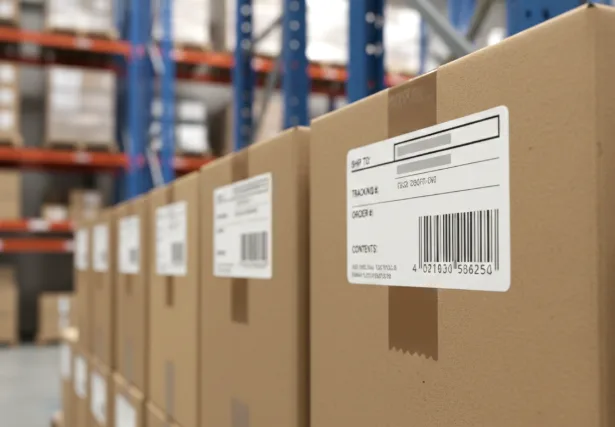
Positive ID Labels print barcode labels and variable data barcode labels for producers and retailers and warehousing across the UK. This guide explains the steps in order, what each one costs you in time, and how to avoid the mistakes that cause a barcode to fail at the till.
Where a Barcode For Retail Actually Comes From
A barcode for retail is two things: a number, and a printed representation of it. The number is a GTIN, a Global Trade Item Number. It identifies your specific product, in its specific size and variant, anywhere in the world. Different flavour, different size, different pack count: each needs its own GTIN.
GS1 administers these numbers. In the UK that is GS1 UK, and you obtain numbers by becoming a member and licensing a range. The cost depends on how many numbers you need and your turnover, so check current rates directly with them.
The printed barcode for retail is the machine-readable version, almost always EAN-13 for retail products sold in Europe. That is the familiar thirteen-digit barcode you see on supermarket shelves.

Why You Should Not Buy a Cheap Barcode For Retail Online
You will find websites selling individual barcode numbers cheaply, often numbers originally issued years ago and resold.
Major retailers generally will not accept them for your retail price labels. Their systems verify that a GTIN traces back to the company selling the product, and a resold number traces back to whoever originally licensed it. Discovering this after your packaging is printed is an expensive way to learn it.
If you are selling only through your own website or a local farm shop, a resold number may never cause a problem. If you have any ambition to sell through a supermarket or a national retailer, license properly from the start.
Getting a Barcode For Retail: The Order of Operations
Doing these in the wrong order is where launches get delayed.
- License your numbers from GS1 before artwork is finalised. Lead time here is administrative, not technical, but it is not instant.
- Allocate a GTIN to each variant. One per product, size and pack configuration. Keep a spreadsheet, because this becomes hard to reconstruct later.
- Generate the barcode for retail at the correct size. EAN-13 has a nominal size and a permitted range of magnification. Shrinking it below the minimum causes scan failures.
- Place it where it can be scanned. Flat surface, away from curves and seams, with the quiet zones either side left clear.
- Test before you print thousands. Print a proof and scan it with a real scanner, not a phone app.
Printing a Barcode For Retail So It Actually Scans
This is where we get involved, and where most avoidable failures happen.
Never supply a barcode for retail as a JPEG. Compression artefacts blur the bar edges, and a printer cannot reproduce the crisp transitions a scanner needs. Supply the number and let the barcode be generated properly, or supply vector artwork.
Respect the quiet zones. The clear space either side of the barcode for retail is part of the symbol, not padding. Design elements creeping into it cause scan failures that look inexplicable.
Keep the contrast high. Black bars on a light background. Do not use any other colours as this will risk higher failure rates.
Do not shrink it to fit. If the barcode for retail does not fit, redesign the label rather than reducing the symbol below its minimum size. The larger and more available the barcode, the better the read rate and user experience when scanning.
Leave the bar height alone. Truncating a barcode to save vertical space reduces the angles at which a scanner can read it, which slows every checkout it passes through. Some UK retailers like Aldi, encourage extremely tall barcodes to speed up the checkout process.
If you are printing barcode labels using a thermal printer, there is a useful guide about barcode label printing here.
What a Barcode For Retail Costs Overall
Three separate costs, and people often conflate them.
GS1 membership and number licensing is an annual cost paid to GS1, based on your requirements and turnover. Check their current pricing directly.
Artwork is usually minimal. Placing a correctly generated barcode into existing label artwork is a small job, and press-ready artwork is processed at no charge. You can generate accurate, print-ready barcodes using Terry Burton’s Barcode Generator in a number of scalable formats.
Printing is simply the cost of your labels. A barcode for retail does not cost extra to print. It is ink on a label like anything else.
For most small producers the licensing is the meaningful cost, and the printing is what it would have been anyway. Call 01332 864895 if you want that broken down for your run.
Frequently Asked Questions
Do I need a different barcode for each product size? Yes. A GTIN identifies a specific product in a specific size and pack configuration. A 250g pack and a 500g pack of the same product need different numbers, as does a multipack.
Can I use a QR code instead of a retail barcode? Not for scanning at a till. Retail checkout systems expect EAN-13. QR codes are increasingly used alongside barcodes to carry additional information for consumers, but they do not replace the retail barcode. You can read more about the emerging GS1 Sunrise Project here.
What resolution do I need to print a barcode reliably? For a full-size retail barcode, higher resolution gives cleaner bar edges and better scan rates. Graphic formats like SVG (Scalable Vector Graphics) and EPS (Encapsulated PostScript) are ideal, as they are fully scalable without loss of graphical data. JPEG or other raster formats are not suitable for barcodes as they are “lossy” meaning they lose graphical fidelity when scaling and can inherently contain colours other than black as part of the compression algorithm.
My barcode scans at home but fails at the retailer. Why? Different scanners have different tolerances, so a marginal barcode passes one and fails another. Treat any barcode that only just scans as a failure and find the cause, which is usually print quality, insufficient quiet zones or poor contrast. Using a raster format image for your printed barcode is a common source of this problem.
Can you print the barcode onto my existing labels? Yes, either printed as part of the label or added later as variable data using an overprintable varnish. Which suits depends on whether the number is fixed per run or changes.
How long does it take to get a barcode? The GS1 side is an administrative process, so allow time for it rather than assuming it is same day. The printing side is quick: our digital label work is typically three to five working days once artwork is approved.
Ready to Print?
Once you have your GTIN, we will handle the rest. Send us the number and your artwork, and we will generate the barcode at the correct size and specification, print it properly, and check it scans before it leaves us.
If you are not sure whether your existing artwork will scan reliably, send it over and we will look at it. We would far rather flag a problem before printing than after.
Call 01332 864895 or use the enquiry form. We quote a fixed price over the phone, not an estimate.