Food labelling mistakes are rarely intentional. A café owner isn’t trying to hide an allergen. A bakery isn’t deliberately printing outdated information. Yet labelling mistakes happen regularly in food businesses of all sizes, from one-person operations to established manufacturers. Most errors aren’t caught until someone almost gets hurt or a trading standards inspection flags them.
The good news: the mistakes are predictable. More importantly, they’re preventable. Understanding why they happen is the first step to building a process that stops them before the labels reach your customers.
The Seven Most Common Food Labelling Mistakes
1. Missing Or Incorrectly Declared Allergens
Missing allergens are the most serious food labelling mistakes because they directly endanger consumers.
How it happens: A supplier changes an ingredient. Nobody updates the allergen information. A recipe is adjusted to reduce costs, a new type of nut butter replaces the old one, or a chocolate manufacturer changes their cocoa blend. The label isn’t updated, and the new ingredient carries an allergen the previous one didn’t.
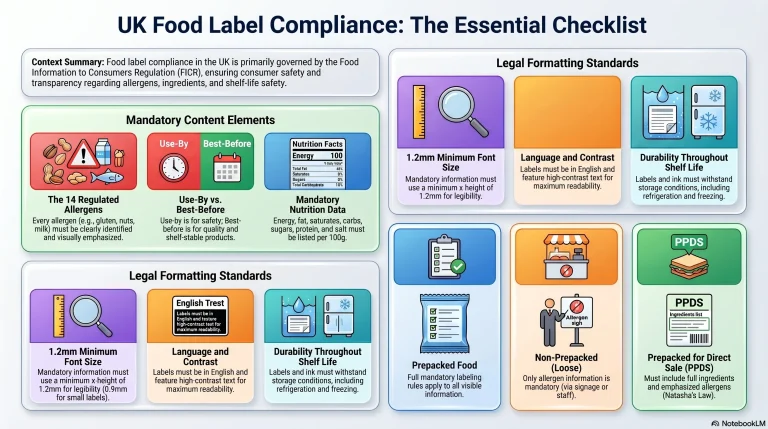
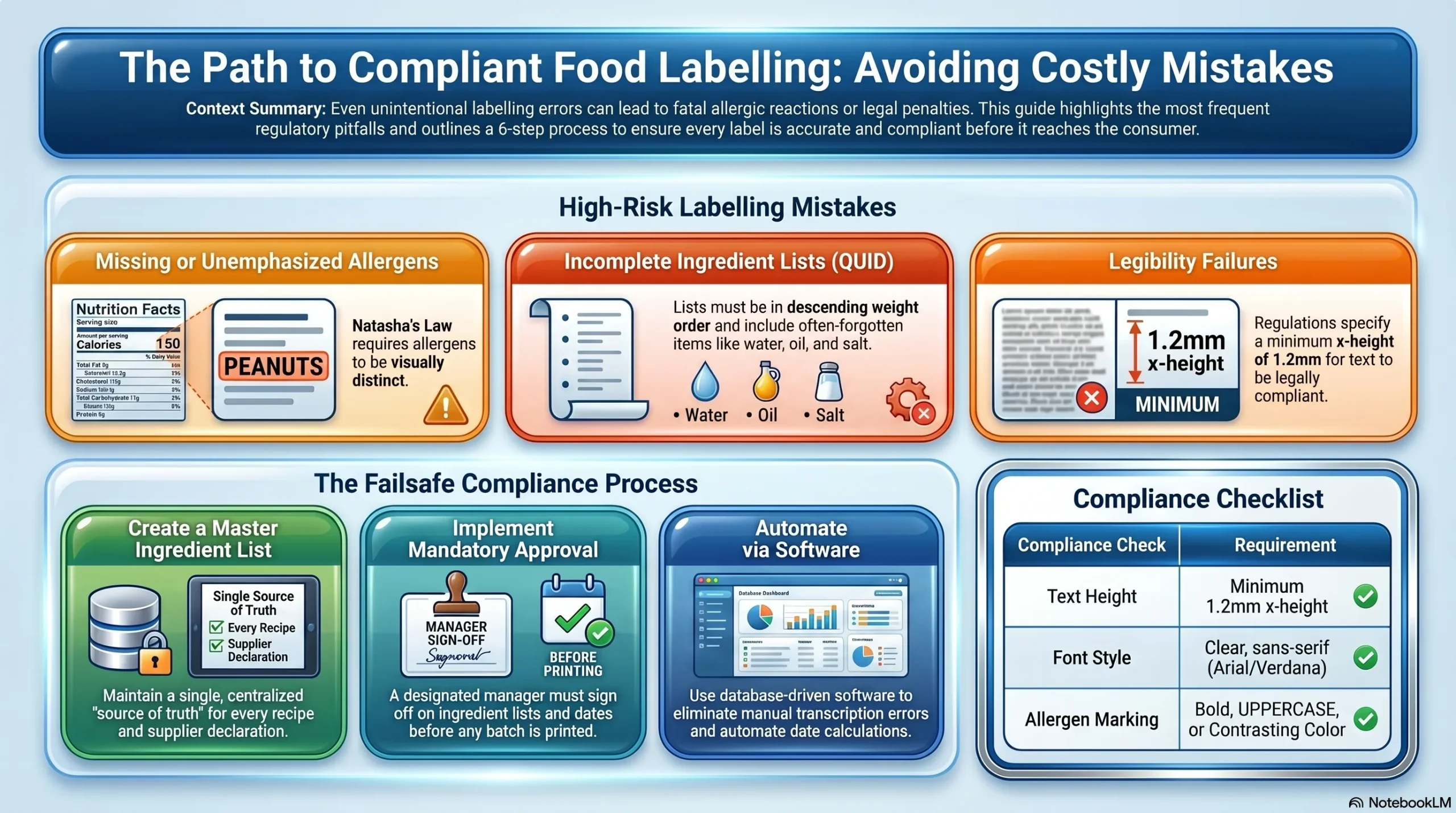
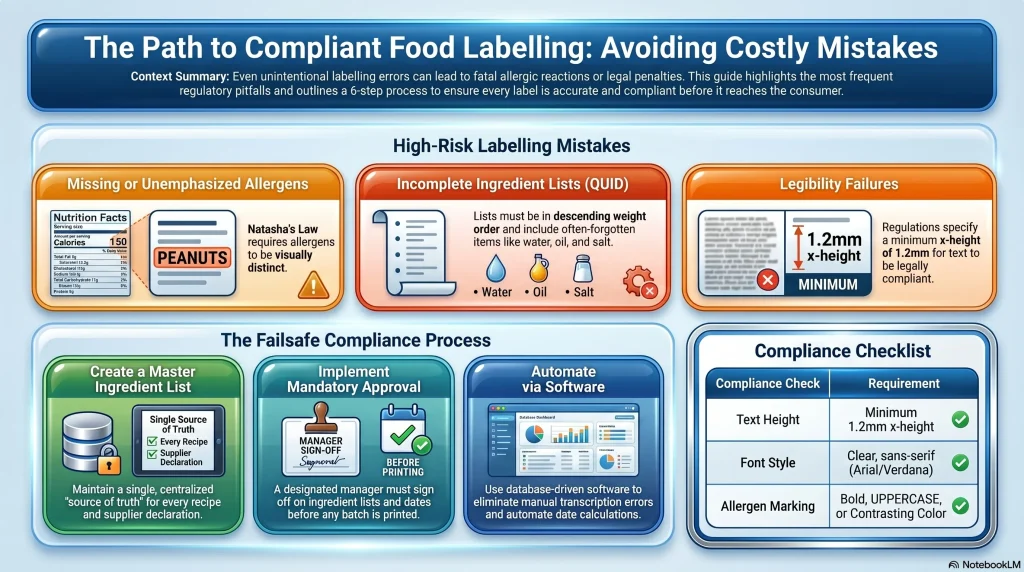
Another common variant: the allergen is listed in the ingredients but is not clearly distinguished. Natasha’s Law requires allergens to be visually emphasized; bold text, a different colour, or capital letters. If the allergen is buried in the text without emphasis, the label is non-compliant even though the information is technically there.
Why it matters: Allergic reactions range from minor discomfort to fatal. A missing tree nut declaration or an un-emphasised milk allergen in a product labelled “dairy-free” creates serious legal and safety liability.
How to prevent it: Every recipe change triggers an allergen check. Document all 14 regulated allergens for each product. Whenever a supplier changes, request the new ingredient’s complete allergen declaration. Before printing new labels, have someone responsible (owner, manager, head chef etc) sign off on the ingredient list and allergen emphasis.
2. Incomplete Or Inaccurate Ingredients Lists
Ingredients lists must be complete and in descending weight order – also known as a Quantitative Ingredient Declaration or QUID Declaration. Common mistakes:
- Describing ingredients too vaguely e.g. listing “spice mix” instead of the individual spices (some of which may be allergens).
- Forgetting that water, oil, and salt count as ingredients and must be listed.
- Using old ingredient lists from previous versions of a recipe. Omitting minor ingredients entirely because they seem insignificant.
A sandwich label that says “turkey, lettuce, tomato, mayonnaise” but doesn’t list the eggs, water, salt, and spices in the mayo, or the unknown ingredients in the shop-bought dressing is incomplete.
How to prevent it: Write out every single ingredient that goes into a product including water, salt, and any shop-bought components. For shop-bought components, get the full ingredient declaration from the supplier. Ingredients lists must be current to the actual recipe you’re using today, not the recipe you used six months ago.
3. Allergens Not Clearly Emphasized
Emphasis is required by law. It must be immediately apparent. Common failures:
Bold text that’s only slightly darker than normal text. Different coloured text that doesn’t stand out. Allergens listed but not grouped separately or highlighted. Emphasis that’s inconsistent across different batches (sometimes bold, sometimes not).
If someone has to read carefully to spot the allergen, the emphasis has failed.
How to prevent it: Use label design software that applies emphasis automatically. If printing manually, print allergens in a noticeably different format (UPPERCASE, bold + larger, or bold + colour). Always print a test label and check that emphasis is immediately obvious before running the full batch.
4. Incorrect Date Marking
Mistakes with use-by and best-before dates:
Using the wrong type of date of use-by for products that should have best-before, or vice versa – see our date labelling guide. Printing a date that has already passed (printing error or batch error). Not updating date information when shelf life changes due to a new recipe or storage method. Missing storage instructions that are needed to justify a best-before or use-by date.
How to prevent it: Use software that automatically applies date and date offset calculations as found in Label Direct or EnLabel labelling software. This lets staff print the actual current date accurately without the need to intervene. If dates are pre-printed, they must be correct; use quality-checking systems to catch errors before labels reach production.
5. Labels That Fail Legibility Requirements
Legibility requirements aren’t optional aesthetics, they’re legal standards.
Failures include: Text that’s too small to read (regulations specify minimum x-height of 1.2mm for most information). Insufficient contrast between text and background (light grey text on white background, for example). Text printed at an angle or direction that makes reading difficult. Font choices that are inherently difficult to read (e.g. overly decorative fonts).
How to prevent it: Use clear, sans-serif fonts (Arial, Helvetica, Verdana) or pre-installed printer fonts in sizes appropriate to the label (typically 7pt minimum for ingredient lists on small labels). Test legibility by printing a sample and reading it from a normal distance. Black or dark text on white or light background is the safest choice.
6. Using Outdated Label Templates
A surprising percentage of labelling errors stem from this single cause: outdated templates.
How it happens: An old label template gets shared with new staff. The template is from last year’s recipe. A previous employee created it and nobody has updated it. The template is used across multiple products but has ingredients for product A when labels are being made for product B.
How to prevent it: Maintain a single, current version of each label template. Old versions should be deleted or clearly marked “DO NOT USE.” Use version numbers on templates (v1, v2, v3) and update the version whenever any ingredient or information changes. Store templates in a shared location where there’s only one master copy, not multiple people with different versions on their computers.
Manage a single database for your label data. Remove old versions of the database or just continually overwrite old database data by running a single live database.
7. Labels Not Updated When Ingredients Or Suppliers Change
Ingredient and supplier changes are the most common trigger for non-compliant labels that make it to customers.
A bakery buys a new brand of chocolate that contains soya, not realizing their previous brand didn’t. The label isn’t updated. A café switches to almond milk from oat milk. The label stays the same. A manufacturer receives notice that a supplier is changing their recipe slightly, the label doesn’t change.
How to prevent it: When a supplier changes or ingredients are modified, immediately update your master ingredient list and label template. Don’t print labels based on old information while waiting for a full review. Before using any new ingredient from any supplier, verify its allergen status and complete ingredient declaration. Have a process for supplier notifications that flags when ingredient changes occur.
The Root Cause: Lack Of Controlled Process
These seven mistakes have a common thread. They happen when:
- Responsibility is unclear. Nobody knows who is actually responsible for checking that labels are accurate before printing.
- Data management is loose. Ingredient information is scattered across different documents or people’s knowledge rather than centralized.
- Version control is absent. Multiple outdated versions of label templates exist simultaneously.
- Approval isn’t required. Anybody can print a label without someone checking if it’s correct.
- Staff training is minimal. New employees don’t understand why allergen accuracy matters or how to check it.
- Changes aren’t tracked. When a recipe or supplier changes, it’s not documented that label information needs updating.
How To Build A Process That Prevents These Mistakes
Step 1: Document Everything. Create a master ingredient list for each product showing ingredient, allergen status, and source (supplier name). This becomes your single source of truth. Positive ID Labelling provides Nutridata – food labelling and nutrition labelling software for this exact purpose.
Step 2: Centralize Label Templates. Store all current label templates in one location. Mark old versions as archived or delete them when they are redundant. Use version numbering if you wish to keep old data available.
Step 3: Require Approval. Before printing labels, someone who understands the labelling laws should be made responsible and must review and approve the ingredient list, allergen emphasis, and dates. They sign off or initial the approval.
Step 4: Update Immediately. When anything changes – supplier, ingredient, recipe – the master list updates that day. No delay. Nutridata can help food businesses achieve this with ease.
Step 5: Check Before Printing. Always print a test label and inspect it before running a full batch. Check allergen emphasis, legibility, dates, and spelling.
Step 6: Destroy Old Stock. When new labels are printed, physically destroy or clearly mark old labels so they cannot be used.
Step 7: Train Your Team. Everyone who handles labelling understands why accuracy matters and how to check it. This takes 15 minutes per person, once.
This isn’t complicated. But it is serious and does require intentionality.
Labelling Solutions That Reduce Error
Some mistakes can be engineered out of the system:
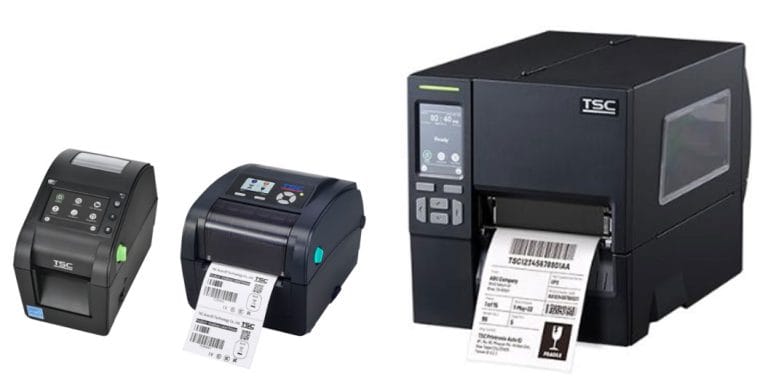
Thermal printing systems – staff print labels in-house with software that prevents common errors (date errors, ingredient list mismatches). Works best for businesses labelling lots of different date sensitive items daily.
Pre-printed labels from a manufacturer – the printer ensures allergen emphasis, legibility, and quality control. Your job is to provide accurate ingredient information. Works best for stable product ranges. Items can be overprinted in-house for use by or best before dates with a thermal printer or use a labelling gun with suitable labels for fast labelling.
Label management software – database systems that store master ingredient lists and generate label artwork automatically, eliminating transcription errors. Positive ID provide Nutridata Lite, free of charge to label customers to help you solve your food labelling challenges.
For small businesses without sophisticated systems, the primary investment is process discipline, not technology. A simple checklist before printing catches most mistakes.
FAQ: Your Food Labelling Mistake Questions Answered
Q: If I catch a labelling error before customers get the product, does it still matter?
A: You’ve prevented the problem, which is good. But from a compliance perspective, printing a non-compliant label, even if it’s never sold, is still technically a breach. Document that you caught it, destroyed the labels, and printed corrected ones.
Q: What happens if a customer finds an allergen isn’t listed on our label?
A: Contact the customer immediately. If there’s any risk they’ve consumed the product, advise them. Report to your local trading standards authority. Consider issuing a public recall if the product is widely distributed. This is a serious situation.
Q: How often should I update my ingredient lists?
A: At minimum, review it annually. But realistically, whenever a supplier changes or you modify a recipe, update it immediately. Nutridata software makes this easy and any ingredient that changes updates in all products using that ingredient automatically on the next export.
Q: Can I use a generic “May contain” label to cover myself?
A: No. Natasha’s Law and UK food labelling regulations require specific allergen declarations. “May contain” is permissible only where there’s documented cross-contamination risk, not as a blanket caution. You should consider risk assessing potential for cross-contamination of allergens in your place of work and determine the best solution from that – see our post about allergen warning labels.
Q: What’s the difference between my responsibility and my supplier’s responsibility?
A: You are responsible for what’s on your label. Your supplier is responsible for giving you accurate ingredient information. Get full declarations from suppliers and verify them before printing.
Q: Can I print labels at home on my colour printer if my business is small?
A: Yes, if the labels are legible, the information is accurate, and the printing is permanent (won’t smudge or fade). However, this is labour-intensive and error-prone. Even small businesses usually benefit from thermal or pre-printed labels. Positive ID Labels can help you determine the best course for your personal circumstances.
Q: Should I have a backup copy of my label templates?
A: Yes, but keep the backup clearly marked as backup. Use only the current master template for printing. This prevents accidental use of old versions. This makes recovery from a failed system quick and easy – Positive ID Label customers benefit from free support for disaster recovery and will help you get back up and running. Call us on 01332 864895 to discuss how we can support your food labelling systems for free as a labelling customer.
Q: How do I document that I’ve checked a label for accuracy?
A: Print a test label, inspect it, and initial and date the test print. This is your proof that approval happened. File it with your records.
Q: What’s the cost of fixing a labelling error?
A: Reprinting labels costs money. Recalling products costs much more. Regulatory fines are expensive. Worst case, a serious allergic incident is incalculable in terms of legal liability and reputational damage. Positive ID Labels can help you mitigate the risk with our years of experience in the sector.
Q: If I outsource label printing, does the printer check my ingredient information?
A: The printer will check that your artwork is technically correct (legible, correctly formatted), but they should not be responsible for verifying that your ingredient information is accurate — that’s your responsibility as the food business operator. Positive ID Labels have exhaustive guides on food labelling to help ensure your labels are legally compliant and protect your customers.
Moving Forward
Food labelling mistakes are preventable. The solution isn’t complex; it’s building a process that catches errors before printing and checking before labels reach customers.
Start by documenting your current ingredient lists and labelling process. Identify your biggest risk (likely missing allergens or outdated supplier information). Then implement one control: somebody has to sign off on every label before it’s printed.
That single step – approval before printing – catches the majority of errors.
At Positive ID Labels, we work with food businesses to help them set up labelling systems that prevent these mistakes. Whether that’s thermal printing for daily labelling, pre-printed labels with built-in quality control, or advice on process improvements, we can help.
Want to review your labelling process or discuss which printing method prevents the most errors? Call us on 01332 864895. We’ll ask detailed questions about your current setup and recommend changes that reduce your compliance risk. Or fill out our contact form and we’ll call you back.
Getting labels right is how you keep customers safe and keep your business out of regulatory trouble.