
Labeldata System
LabelData is a software solution built in-house and provided free of charge to our label purchasing customers using our food labelling solutions. In essence, we know that people can use tablets and phones far more easily than computers – so we build a system to make label printing easy too!
LabelData works in conjunction with Nutridata, Label Direct and our thermal label printers – both TSC and SOLO converted TSC models. LabelData provides a really simple user interface to print your labels in an intuitive way.


Labeldata System – free android printing software for our label customers
Using labelData, your printer is set up with categorised labels – think white bread sandwiches, brown bread sandwiches, baguettes and wraps. It is perfect for sandwich labelling systems. If you tap that category, each product you offer is listed in the app. Tap the filling you require and tell the system how many copies you want – hey presto – all your labels print on demand with ease!
LabelData System Benefits
- Idiot proof Android interface
- Works with Android tablets or phones
- Minimal training time – about a minute per person!
- Secure – your labelling cannot be messed up by end users
- 2 minute set up
- On screen, inline settings tweaks
LabelData System Features
- Reliable “poll and send” technology
- Updates cascade in instantly across all devices
- Centrally controlled system – no accidental errors from staff mistakes
- Works over your local wifi – no wires
- Wifi or hard wire your network printer
- At “print time” use by dates and location control
What does the LabelData System deliver?
LabelData is an app that initiates the print action of your labels on demand. It simply actions your request for labels – but does it in such a simple way, it is child’s play. It is an free printing method option for our label customer and it is your choice if you want to use it (you can just use your computer if you want).
As a food business, we recognise that printing your labels is a tedious task hindering the real value of your food business – producing amazing food. We know there is a minefield of regulations you need to meet and we know how challenging that is to fulfil, especially since Natasha’s Law increased requirements for prepacked foods. So we developed a range of products to help food businesses deliver their labelling obligations with the minimum of fuss and maximum reliability.
LabelData holds your label designs and data in your account in a central website. You prepare your labels on your windows PC using Label Direct and output that data as a print file. You then upload the data to our LabelData website under your account login. Your labels are now ready to be called up on demand via your Android app.
On any android device, you simply install the LabelData app, log in, set up some local settings, then you are ready to print labels from your phone or tablet with a few taps on the screen.
The user interface is so simple, any user can grasp it in a matter of seconds. Tap the category, tap the filling, select the quantity and hey presto – labels with the correct location and use by date printed on demand.
Browse the full Labelling Solutions range for related products or read our allergen labelling guide.

I had an amazing experience working with Positive ID Labelling, especially Natalie. The labels were absolutely brilliant quality and exceeded my expectations. Natalie was fantastic throughout the whole process. Communication was amazing from start to finish. She was so helpful, guided me through everything, and made the whole experience stress free and enjoyable. She was also genuinely funny and a pleasure to work with, which made everything even better. I’ll definitely be working with Natalie again on future projects and would highly recommend Positive ID Labelling to anyone looking for high-quality labels and excellent customer service.

Fantastic label printing service. Labels to a very high specification. Helen was great at sorting out our requirements, quotes, and order.

We’ve had a great experience working with this supplier, especially with Natalie - she is always very responsive, professional, and friendly. The pricing is highly competitive and the sales service has been excellent from start to finish. If I could offer one suggestion, it would be to improve the account and invoice management process. It would be really helpful if there were a system for clients to easily track their past orders and invoices in one place. Overall, very pleased with the service and look forward to continuing our collaboration.

Absolutely brilliant service from start to finish. The team are brilliant and the product was excellent quality and exactly what I wanted. Natalie is amazing as are her colleagues. Will definitely be a returning customer. Thank you

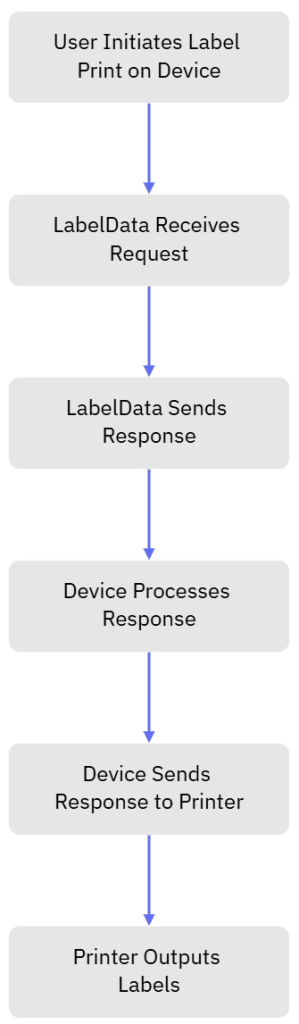
How does the LabelData system work?
The LabelData system works over the internet. Your labels are stored online. Your tablet, connected to the internet, “polls” your account for the labels you ask for using the tablet. The website then sends the label data to the tablet. The tablet then processes the labelling data according to a number of local variables:
- How many labels should be printed?
- Is there a use by date – what should it be?
- Is there a location – place that on the label?
- Are there any local adjustments I need to apply (e.g. move text left/right/up/down)?
- Should it override standard print colour depth?
Once processed, the tablet sends this data onto the local networked printer – which prints however many labels you needed, with all the appropriate data as you requested.
Detailed Set Up of a LabelData System
Step One: The first step in using the LabelData System is to prepare your label information using our Nutridata System – also provided free to our food labelling customers. This software prepares all the information you need to put on your labels.
Step Two: The second step is to design your labels and link it to the export file you got from Nutridata. You then print all of the labels – but instead of printing them to your printer, you print them to a file – a simple text file with the layout and content of your labels (normally called Output.prn).
Step Three: The third step is to log into your LabelData account online. Here you will be asked to upload the data from Nutridata in the form of an excel file (normally called export.xls). You will also upload the Output.prn file to the same website.
The website will then check everything is correct and confirms as such or indicates any issues.
You only do this step once and your system is ready. If you need to make changes to your labels:
- Change layout only: repeat steps 2 and 3
- Change content: repeat steps 1, 2 and 3
- Change both content and layout: repeat steps 1, 2 and 3
Step Four: Open your LabelData app on your tablet. On the first ocassion, you need to log into your account and identify the IP address on your labelling printer (which must be connected to your local network).
- Tap the category of label you want to print (you set that category in Nutridata)
- Tap the actual label in that category you want to print
- Add or subtract use by or best before days (if set up)
- Select print quantity
- Tap print
The system is so straightforward, a complete novice can pick it up in a few minutes.